WordPress object cache – must have or not?
WordPress object cache – is a built in set of functions, that can cache some data, parts of your page or even whole page using different caching systems. For example – it can cache data from database, pre-generated menus, parts of your template, widgets, etc. Idea of any caching is to get fast access to data, that is not being often changed. In general – by using cache – you should use less CPU resources and retrieve pre-generated data from a faster storage, spending less time on generating final results.
WordPress core has idea of object caching and provides functions to store, retrieve and delete data from object caching. But it does not provide final implementation of a proper cache storage, leaving this up to you – website owner. This leads to a conclusion, that you can use any sort of cache storage and overall cache speed will depend on it. Most common cache storage mechanisms are Redis, Memcache, MySQL database and file-based cache. To use any of them – you need appropriate plugin, that will actually handle work towards your cache storage.
Another important part, beside cache storage – is that WordPress will not use object caching by itself. Your theme and your plugins should be using it. And this, in my opinion, is the most tricky part. If you develop a plugin or a theme for your website – and you are aware of benefits of object caching – you can then, with some logic and care, use it and benefit from it. But if you plugins or theme was not built to use object caching – then it will have no effect on your website
And because of different implementation approaches – I am quite skeptical about hard-requirement for it. And this is why this article is coming up. I want to test object caching and how it affects TTFB (time to first byte) timing on an empty and on a messy website.
What will be measured
I will measure TTFB – time to first byte – which is time to the first response from server. Usually this is time needed for server to process your request and start sending back generated HTML page. Also I will measure time, required to load HTML of the page. I will benchmark 2 different WordPress sites – totally empty and one with pre-loaded test data and several heavy plugins. I will measure time without object cache and with using several different object cache plugins, to see how it performs.
Tested object cache plugins
Since different object cache plugins can use different storage backends and have different implementation logic – I will test different most popular plugins to see, if there is any difference in performance. Plugins, that are being tested: Redis cache, Docket cache (uses file based storage), SQLite cache (uses SQLite and APCu)
Benchmark results
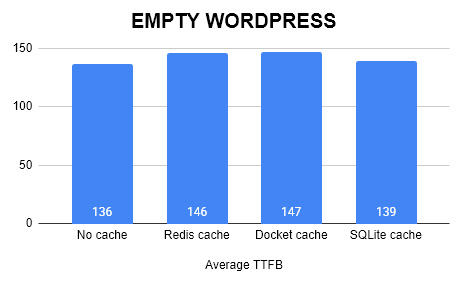
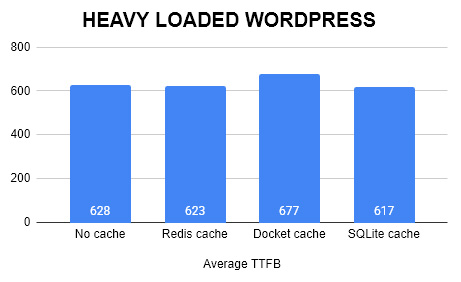
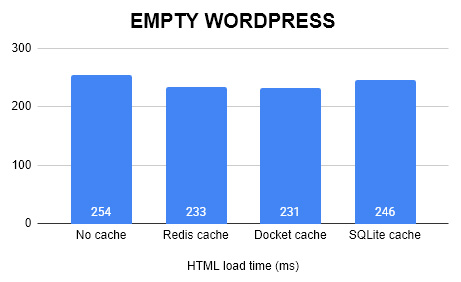
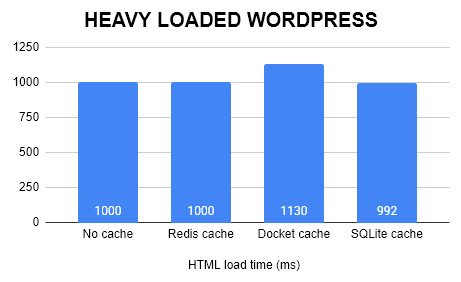
These benchmark show, that my initial assumption was quite right. Object cache is not a miracle and not universal fix. It depends on implementation and whether your template and plugins actually use it. I would say, that my chosen “heavy” plugin/theme list does not make use of Object cache efficiently, but on other customer websites I have seen some slight improvements, especially combined with Litespeed caching.
Empty WordPress is probably not using object caching a lot and therefore adding a plugin would actually make TTFB worse – as server will now have to process more (connect to object cache). While for heavy loaded plugin it looks a bit more promising. Probably theme or some heavy plugins will try to use object caching and therefore it will help a bit.
It is definitely worth trying and experimenting with and without object cache for your theme and your plugins.
Biggest surprise was SQLite object cache plugin – honestly it was first time I tried it and it showed biggest improvements in performance. Redis is solid choice, if your hosting offers it – very deep and serious development under this plugin. For small sites it might be a bit of overkill, but any serious website should consider Redis. Docket cache is simple and will work literally anywhere, but might use more memory to load cached objects.
If you have any other plugins, that are worth testing – feel free to let me know.