WordPress oriented hosting at Levamo
Over last week I was able to test WordPress oriented hosting at Levamo. I have not been sponsored, so this is my personal impression about this hosting. I have benchmarked it against small VPS on a pretty fast hardware, just to see pros and cons. Short conclusion would be – it’s not always about the “hardware metrics”, but those matter too.
When I first visited their page – the first thing I’ve noticed was really fast loading time and really small TTFB. I will mention TTFB (Time to first byte) a lot, as in many cases this is what determines page loading speed. TTFB is time, that your browser is waiting for the first bit of information, which in many cases (not always, but in most cases) comes when page HTML code has been generated. In other words – this is the most simple way to measure how fast your server or hosting is able to go through your theme, plugins and post data in order to cook and generate final HTML page. TTFB does not count time needed to transfer the whole page, but you will often see this parameters in performance tests.
You can see TTFB in your browser’s developer’s console for every request.
What and how I tested
First of all – I have used my WordPress plugin to benchmark server
Second test was for TTFB using third party tool. Since I have chosen to host in Europe – TTFB are for connection within Europe. I concluded 4 tests – without caching, with object cache, with Litespeed cache and with both – object cache and Litespeed cache enabled.
Third test was for concurrent requests – using Apache benchmark tool (ab) – 10’000 requests over 10 concurrent connections. I have tested WordPress without any caching plugins and with object cache + Litespeed cache. Small note: 10’000 requests over 10 concurrent connections is a lot, bare in mind, that this is quite stressful test.
And to make things more interesting – I have run these tests for two different sites – one was totally empty WordPress installation and other one had several heavy plugins, heavy Elementor theme and lots of sample posts. And I have run all these tests on Levamo Start, Levamo Business and my private server on a really fast hardware.
Server hardware benchmark
I have installed empty WordPress and run wpbenchmark.io tests on both Levamo Start and Levamo Business. For some reason several heavy benchmarks simply failed on a cheaper Start package. WordPress installed on Business package did its work a bit better. For comparison I have added score of my own small server, which runs on pretty modern and fast CPU.
Levamo Start – view benchmark results – final score – 7.0
Levamo Business – view benchmark results – final score – 8.2
My server – view benchmark results – final score – 9.8
Person from the Levamo, that I was talking to said, that Business packages run on pretty much the same hardware, but PHP limits are higher and less restrictive. Probably that’s why some of tests were able to complete on Business plan. From the benchmark results I can say, that CPU single core performance is either throttled or CPU is a bit old. Some of old server-CPU, which are still good value for money, might return similar results. For example high results from my server come from high-end desktop CPU (AMD Ryzen 9 9950X) – desktop CPUs are known for better single-core perfomance, but have worse RAM memory bandwidth, that can cause issues under heavy load.
Time to first byte
All TTFB tests were done through speedvitals.com subscription from Europe to minimize network delay.
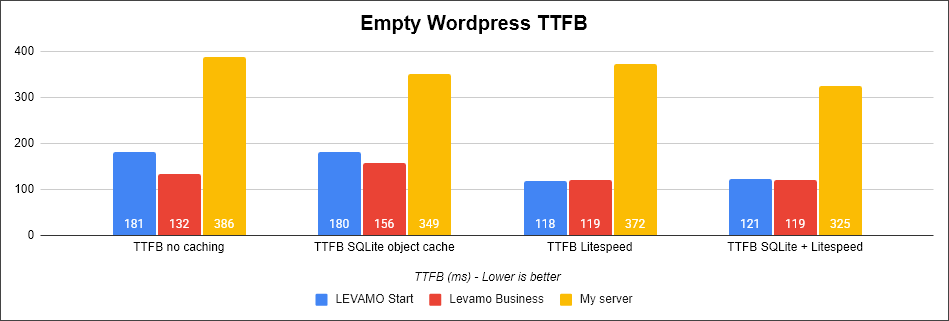
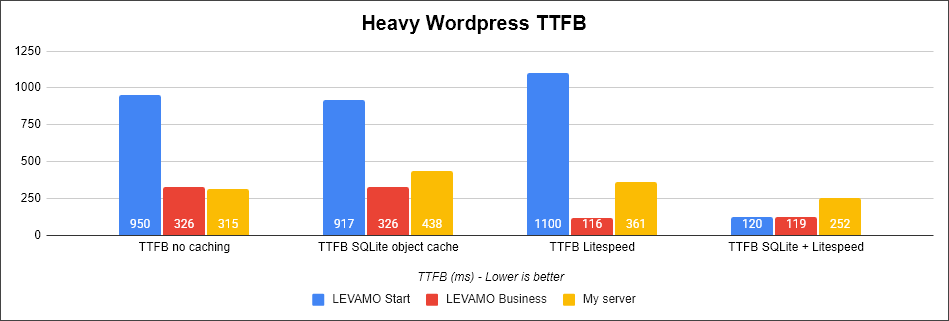
Very interesting findings!
First of all – despite better and faster CPU on my server – it showed slower TTFB. I suspect this is due to fact, that I am using free OpenLitespeed, while from Levamo you get proper commercial Litespeed, which is probably correctly tuned. My server has no special tweaks or tuning.
Second – caching really matters. You can see, how TTFB drops significantly, when both object cache and Litespeed cache are in use. Empty WordPress is fast – the biggest difference is when you load it with some heavy theme and heavy wordpress. Levamo Start start struggling, while Levamo Business seems to have more resourses. My server shows good results even without caching due to better CPU. But once you turn on caching on Levamo – they seems to outperform better CPU straight away!
Stresstest with apache benchmark tool
Next test is done with “ab” tool – apache benchmark tool. Each version of website received 10’000 requests through 10 concurrent connections and keep-alive feature being disabled. From this benchmark we will take number of processed requests per second. This is quite stressful benchmark, as every request has to go through theme, plugins, posts. This shows capacity of the hosting during peak time. Keep in mind – regular pages hardly get as much and as much concurrent requests as this.
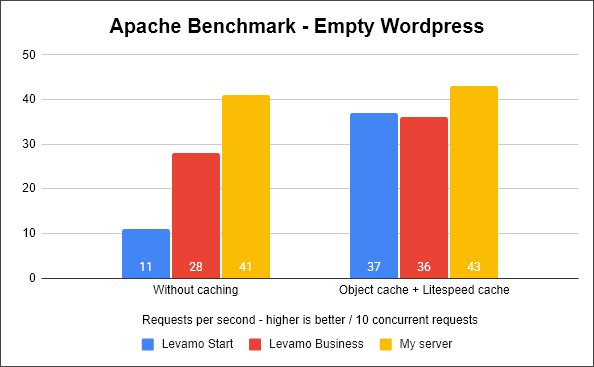
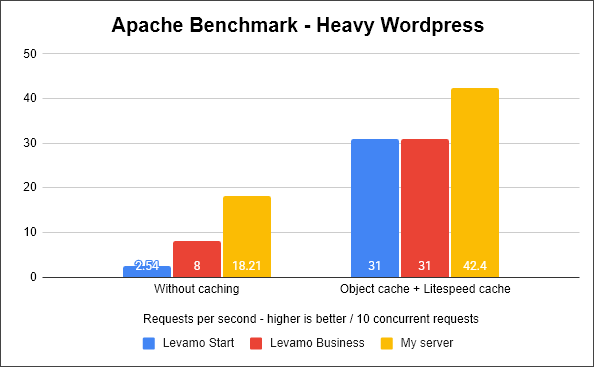
Here is where capacity and performance of server CPU can be seen. Empty WordPress is relatively fast. Business plan from Levamo keeps up for empty Wordress, but once we benchmark heavily loaded WordPress – weak Levamo Start start struggling very fast. But more interesting is to see how much proper caching helps!
Once I added object cache and enabled Litespeed cache – both Levamo sites started working much faster. Yes, this was a test of a single frontpage, but still – it looks very good and very promising!
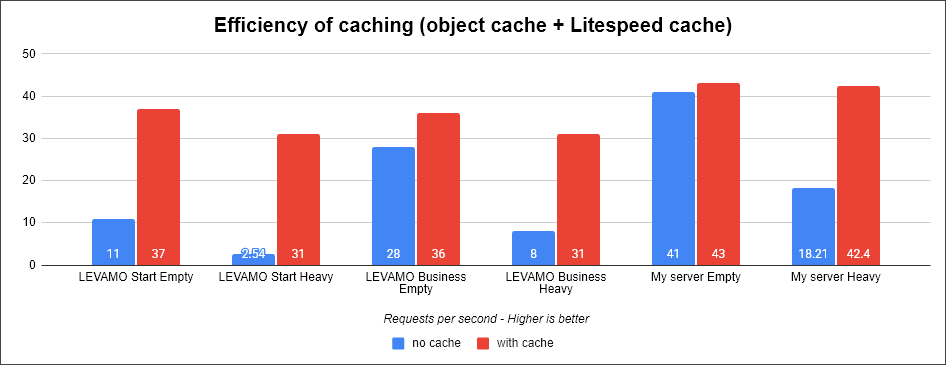
Here is another overview of the same numbers. Properly configured Litespeed and object caching helps a lot, even if you server CPU is not that powerful. My very powerful server was able to outperform Levamo only by very small margin, when caching was enabled.
What I liked about Levamo
Besides nicely configured caching – here are few things, that I have noticed and liked:
- WordPress oriented UI – if you run your website with WordPress – here you will get things tailored and focused on WordPress. Help with migration, installation, backup, login from the control panel. Easy, clean, simple. You can manage plugins without the need to login to WordPress. Easy way to debug errors.
- Other hosting related bits and pieces – you can easily connect several domains, get access to phpMyAdmin to fix database, included Cloudflare Enterprice CDN integration (definitely worth it!)
- WordPress oriented security – while I haven’t looked at it – but Levamo offers more advanced and WordPress tailored security.
- Ability to choose US or European data center.
- Other nice things to have – internal control panel is clean, simple, not overloaded with unnecessary features, AI management (I am sure there are many people, who will use it).
Final thoughts
I think WordPress hosting at Levamo is quite “ok”. While hardware might be not the fastest on the market – proper caching, fast connectivity and WordPress friendly UI makes this a good option to consider. It has strong points and it’s value comes from additional services. You pay extra for things tailored for your WordPress. Included Cloudflare Enterprise is a very nice bonus! Definitely helps, if you just want your WordPress site to work without digging into hosting related technical questions.